Farms
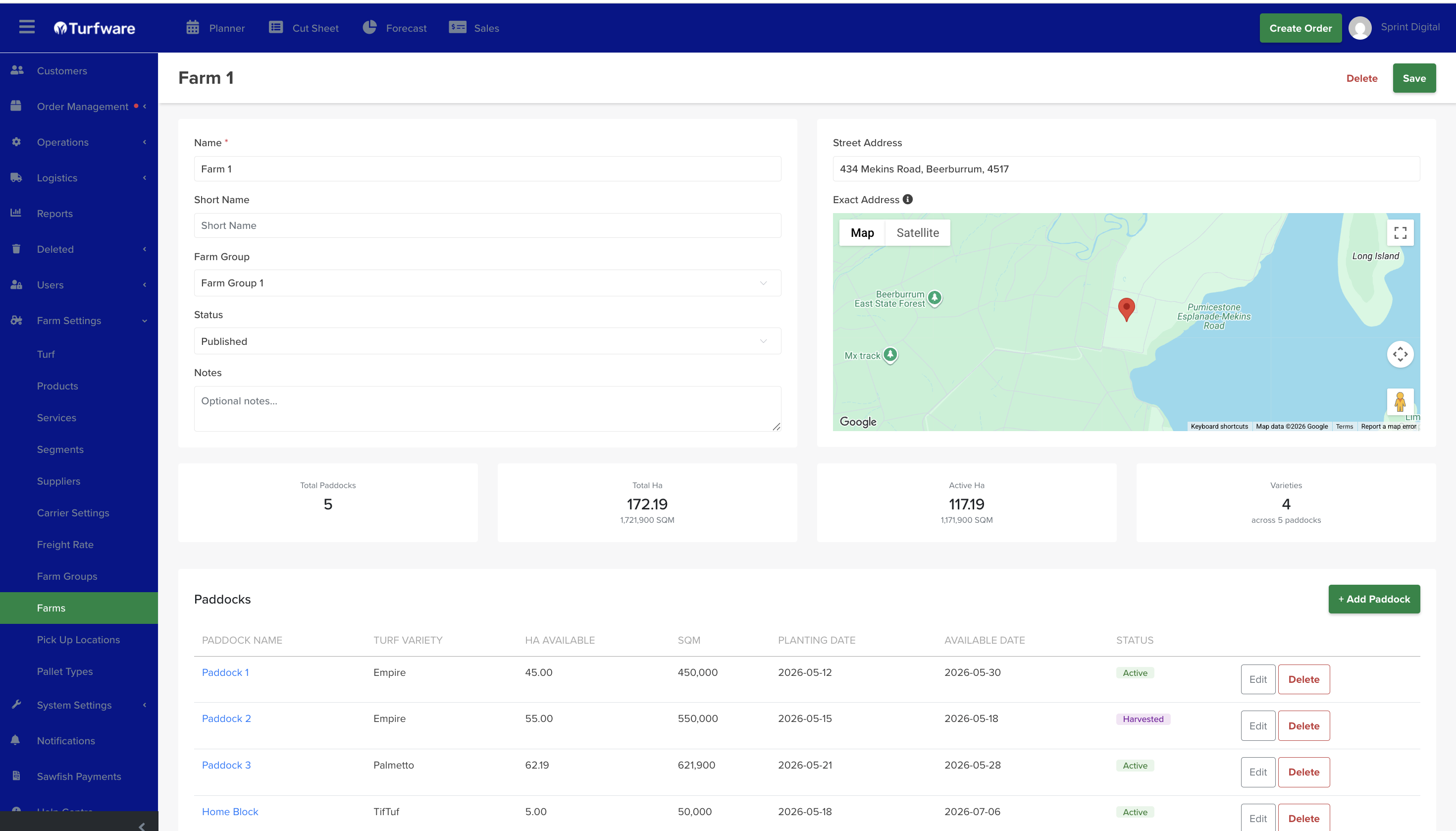
Farms are the properties where your turf is grown and harvested. Each farm holds its location and its paddocks — the blocks where each turf variety is recorded.
Where to find it
Left-hand navigation → Farm Settings → Farms. Click Create to add a farm, or click a row to edit.
Farm details
- Name (required), Short Name, Status (set Published to use it), and Notes.
- Farm Group — the group this farm belongs to.
- Street Address and Exact Address — with a Google map; drag the pin to set the precise location.
At a glance the farm shows Total Paddocks, Total Ha (and m²), Active Ha, and the number of Varieties across its paddocks.
Paddocks
A farm's turf is recorded by paddock. Click Add Paddock and set:
- Paddock Name.
- Turf Variety — the turf grown in this paddock.
- Ha Available and SQM.
- Planting Date and Available Date — when it was planted and when it's ready to harvest.
- Status — Active, Fallow or Harvested.
Edit or delete a paddock from its row. Paddocks feed the farm's totals and give you a variety-by-variety view of what's growing and when it's available.