Cut Sheet
The Cut Sheet is a live window into the Harvesting app — so Admin and Sales in the web app can see real-time harvesting activity without leaving Turfware. As the harvest team cuts and stages turf, the progress bars here fill in.
Where to find it
Top navigation → Cut Sheet.
Choose your window
Set the date range (top right) to the harvest days you want to see.
The Total card
The first card sums everything for the range:
- Orders — completed / total (e.g.
3 / 5). - SQM — square metres cut / booked (e.g.
774 / 815). - Pallets — made up / required (e.g.
19 / 19). - Meters Harvested and Meters RTD (Ready To Deliver) — progress bars showing metres harvested and metres ready to deliver against the total.
Per turf variety
Below the total, each turf variety (Nullarbor, SIR Walter, Sir Grange, Winter Green Couch, GT-BUFF, Australis…) gets its own card with the same figures — Orders, SQM, Pallets, and the Meters Harvested / Meters RTD progress bars — so you can see exactly which variety is cut and which is still on the harvester.
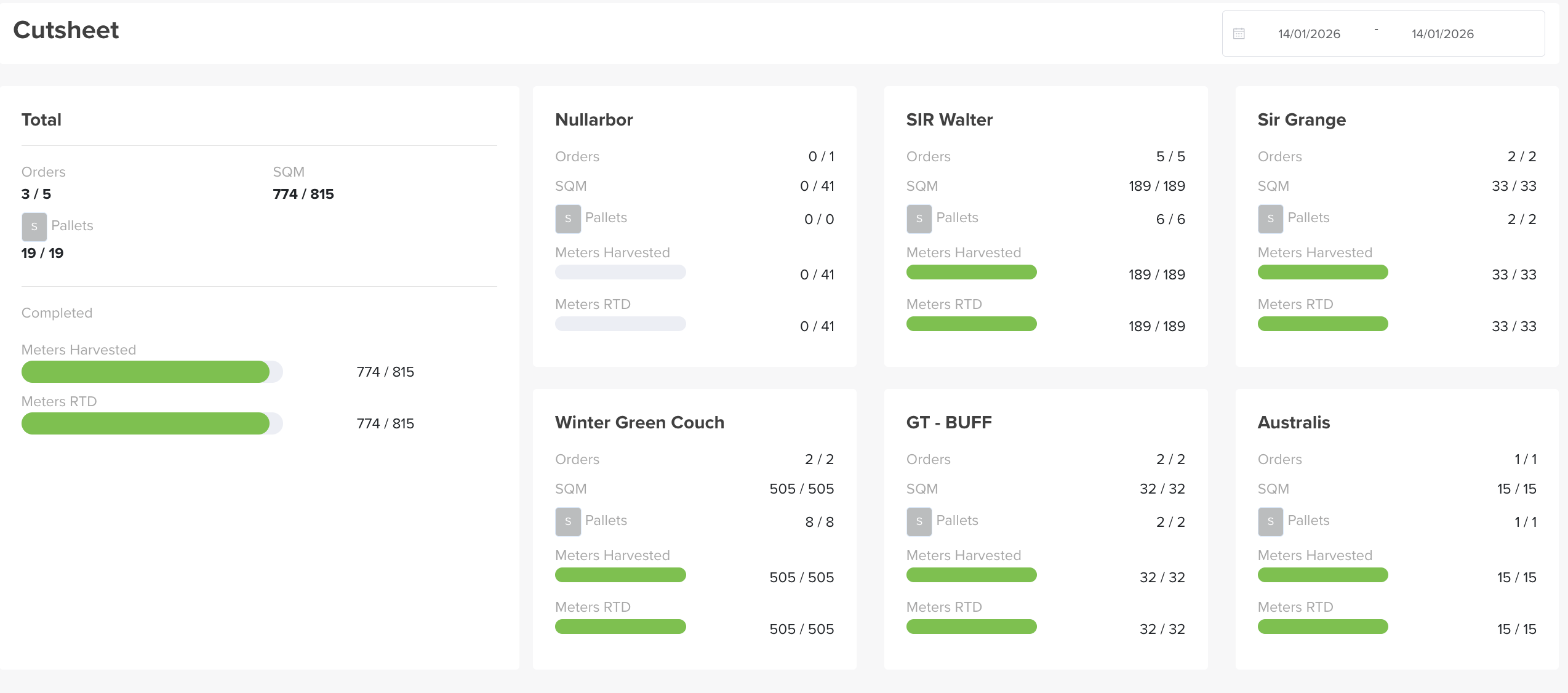
Read the bars at a glance
A full green bar means that variety is fully harvested and ready to deliver; a part-filled bar shows how far the harvest team has got, in real time.