Notifications
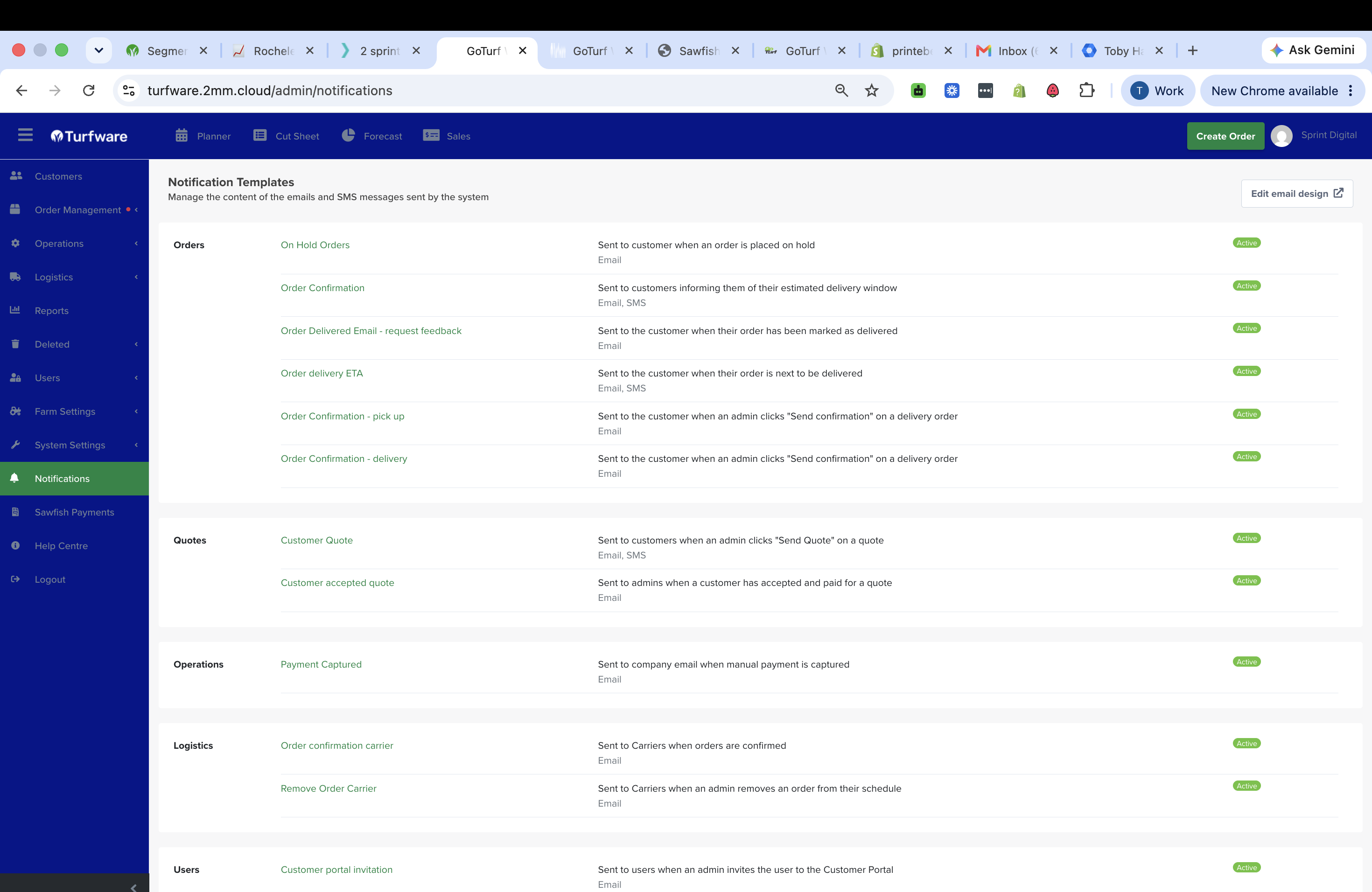
Notifications are the emails and SMS messages Turfware sends automatically as orders move through your workflow — confirmations, delivery ETAs, quotes, carrier notices and more. The Notifications area is where you manage what each message says, whether it goes by email or SMS, and who receives it.
Where to find it
Left-hand navigation → Notifications.
The Notification Templates list
Every message the system can send, grouped by area — Orders, Quotes, Operations, Logistics and Users. Each row shows a short description, whether it's Email, SMS or both, and its status (Active / Inactive). Click a template to open its editor. Edit email design (top right) sets the shared header, footer and colours applied across every email.
Templates can be edited, not created
You can edit any existing template — its name, subject, body and status — but the set of templates is fixed. New templates can't be created and existing ones can't be deleted; set a template to Inactive to stop it sending instead.
What each notification is, and who it goes to
Orders
| Notification | Channel | Goes to | When |
|---|---|---|---|
| Order Confirmation | Email + SMS | Customer (email); order site contact (SMS) | A delivery is scheduled in truck routing — tells the customer their estimated delivery window |
| Order Confirmation – delivery | Customer | An admin clicks Send confirmation on a delivery order | |
| Order Confirmation – pick up | Customer | An admin clicks Send confirmation on a pickup order | |
| Order delivery ETA | Email + SMS | Customer | The order is next to be delivered (driver on the way) |
| Order Delivered Email – request feedback | Customer | The order is marked delivered — invites a review / feedback | |
| On Hold Orders | Customer | An order is placed on hold |
Quotes
| Notification | Channel | Goes to | When |
|---|---|---|---|
| Customer Quote | Email + SMS | Customer | An admin clicks Send Quote on a quote |
| Customer accepted quote | Your staff (internal) | A customer accepts and pays for a quote |
Operations
| Notification | Channel | Goes to | When |
|---|---|---|---|
| Payment Captured | Your company email (internal) | A manual payment is captured |
Logistics
| Notification | Channel | Goes to | When |
|---|---|---|---|
| Order confirmation carrier | Carrier | Orders are confirmed — tells the delivery company | |
| Remove Order Carrier | Carrier | An admin removes an order from their schedule |
Users
| Notification | Channel | Goes to | When |
|---|---|---|---|
| Customer portal invitation | The invited user | An admin invites them to the Customer Portal |
Turn one off without deleting it
Set a template's status to Inactive to stop it sending while keeping its content — see Editing a notification.