Farm Groups
Farm Groups bundle farms and carriers together under one name, with a daily cutoff time. Grouping lets you organise capacity and logistics — and filter by group on the Planner.
Where to find it
Left-hand navigation → Farm Settings → Farm Groups. Click Create to add a group, or click a row to edit.
Setting up a group
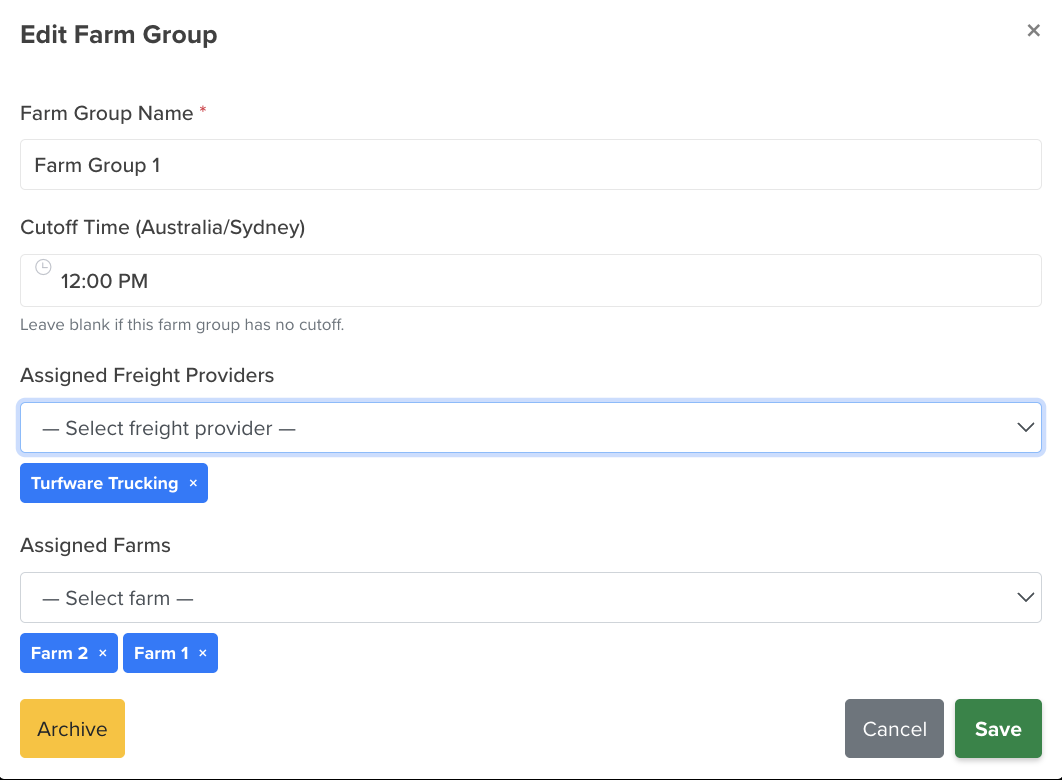
- Name — the group name (required).
- Cutoff time — the daily order cutoff for the group.
- Farms — the farms that belong to this group.
- Carriers — the carriers (delivery companies) assigned to this group.
Archiving
Retire a farm group you no longer use by Archiving it — it's hidden from the list and from Planner grouping, but kept (not deleted). Flip Show Archived on the list to see archived groups, and Unarchive to bring one back.
The Archive action and Show Archived toggle work the same across these records — see Archiving a customer for a picture.